

Cybersecurity Controls Checklist
Article
Cybersecurity Controls Checklist
Cybersecurity standards are constantly evolving as cyberattacks get increasingly complex. The following checklist from the Center for Internet Security (CIS) will allow your organization to evaluate whether the correct controls and safeguards are in place to meet global cybersecurity standards.
Cybersecurity Controls Overview
1. Inventory and Control of Enterprise Assets
Actively manage (inventory, track, and correct) all enterprise assets (end-user devices, including portable and mobile; network devices; non-computing/Internet of Things (IoT) devices; and servers) connected to the infrastructure physically, virtually, remotely, and those within cloud environments, to accurately know the totality of assets that need to be monitored and protected within the enterprise. This will also support identifying unauthorized and unmanaged assets to remove or remediate.
2. Inventory and Control of Software Assets
Actively manage (inventory, track, and correct) all software (operating systems and applications) on the network so that only authorized software is installed and can execute, and that unauthorized and unmanaged software is found and prevented from installation or execution.
3. Data Protection
Develop processes and technical controls to identify, classify, securely handle, retain, and dispose of data.
4. Secure Configuration of Enterprise Assets and Software
Establish and maintain the secure configuration of enterprise assets (end-user devices, including portable and mobile; network devices; non-computing/IoT devices; and servers) and software (operating systems and applications).
5. Account Management
Use processes and tools to assign and manage authorization to credentials for user accounts, including administrator accounts, as well as service accounts, to enterprise assets and software.
6. Access Control Management
Use processes and tools to create, assign, manage, and revoke access credentials and privileges for user, administrator, and service accounts for enterprise assets and software.
7. Continuous Vulnerability Management
Develop a plan to continuously assess and track vulnerabilities on all enterprise assets within the enterprise’s infrastructure, in order to remediate, and minimize, the window of opportunity for attackers. Monitor public and private industry sources for new threat and vulnerability information.
8. Audit Log Management
Collect, alert, review, and retain audit logs of events that could help detect, understand, or recover from an attack.
9. Email and Web Browser Protections
Improve protections and detections of threats from email and web vectors, as these are opportunities for attackers to manipulate human behavior through direct engagement.
10. Malware Defenses
Prevent or control the installation, spread, and execution of malicious applications, code, or scripts on enterprise assets.
11. Data Recovery
Establish and maintain data recovery practices sufficient to restore in-scope enterprise assets to a pre-incident and trusted state.
12. Network Infrastructure Management
Establish, implement, and actively manage (track, report, correct) network devices, in order to prevent attackers from exploiting vulnerable network services and access points.
13. Network Monitoring and Defense
Operate processes and tooling to establish and maintain comprehensive network monitoring and defense against security threats across the enterprise’s network infrastructure and user base.
14. Security Awareness and Skills Training
Establish and maintain a security awareness program to influence behavior among the workforce to be security conscious and properly skilled to reduce cybersecurity risks to the enterprise.
15. Service Provider Management
Develop a process to evaluate service providers who hold sensitive data, or are responsible for an enterprise’s critical IT platforms or processes, to ensure these providers are protecting those platforms and data appropriately.
16. Application Software Security
Manage the security life cycle of in-house developed, hosted, or acquired software to prevent, detect, and remediate security weaknesses before they can impact the enterprise.
17. Incident Response Management
Establish a program to develop and maintain an incident response capability (e.g., policies, plans, procedures, defined roles, training, and communications) to prepare, detect, and quickly respond to an attack.
18. Penetration Testing
Test the effectiveness and resiliency of enterprise assets through identifying and exploiting weaknesses in controls (people, processes, and technology), and simulating the objectives and actions of an attacker.
Security Controls Checklist
1. Inventory and Control of Enterprise Assets
- Establish and Maintain Detailed Enterprise Asset Inventory
- Address Unauthorized Assets
- Utilize an Active Discovery Tool
- Use Dynamic Host Configuration Protocol (DHCP) Logging to Update Enterprise Asset Inventory
- Use a Passive Asset Discovery Tool
2. Inventory and Control of Software Assets
- Actively manage (inventory, track, and correct) all software (operating systems and applications) on the network so that only authorized software is installed and can execute, and that unauthorized and unmanaged software is found and prevented from installation or execution.
- Establish and Maintain a Software Inventory
- Ensure Authorized Software is Currently Supported
- Address Unauthorized Software
- Utilize Automated Software Inventory Tools
- Allowlist Authorized Software
- Allowlist Authorized Libraries
- Allowlist Authorized Scripts
3. Data Protection
- Develop processes and technical controls to identify, classify, securely handle, retain, and dispose of data.
- Establish and Maintain a Data Management Process
- Establish and Maintain a Data Inventory
- Configure Data Access Control Lists
- Enforce Data Retention
- Securely Dispose of Data
- Encrypt Data on End-User Devices
- Establish and Maintain a Data Classification Scheme
- Document Data Flows
- Encrypt Data on Removable Media
- Encrypt Sensitive Data in Transit
- Encrypt Sensitive Data at Rest
- Segment Data Processing and Storage Based on Sensitivity
- Deploy a Data Loss Prevention Solution
- Log Sensitive Data Access
4. Secure Configuration of Enterprise Assets and Software
- Establish and maintain the secure configuration of enterprise assets (end-user devices, including portable and mobile; network devices; non-computing/IoT devices; and servers) and software (operating systems and applications).
- Establish and Maintain a Secure Configuration Process
- Establish and Maintain a Secure Configuration Process for Network Infrastructure
- Configure Automatic Session Locking on Enterprise Assets
- Implement and Manage a Firewall on Servers
- Implement and Manage a Firewall on End-User Devices
- Securely Manage Enterprise Assets and Software
- Manage Default Accounts on Enterprise Assets and Software
- Uninstall or Disable Unnecessary Services on Enterprise Assets and Software
- Configure Trusted DNS Servers on Enterprise Assets
- Enforce Automatic Device Lockout on Portable End-User Devices
- Enforce Remote Wipe Capability on Portable End-User Devices
- Separate Enterprise Workspaces on Mobile End-User Devices
5. Account Management
- Use processes and tools to assign and manage authorization to credentials for user accounts, including administrator accounts, as well as service accounts, to enterprise assets and software.
- Establish and Maintain an Inventory of Accounts
- Use Unique Passwords
- Disable Dormant Accounts
- Restrict Administrator Privileges to Dedicated Administrator Accounts
- Establish and Maintain an Inventory of Service Accounts
- Centralize Account Management
6. Access Control Management
- Use processes and tools to create, assign, manage, and revoke access credentials and privileges for user, administrator, and service accounts for enterprise assets and software.
- Establish an Access Granting Process
- Establish an Access Revoking Process
- Require MFA for Externally-Exposed Applications
- Require MFA for Remote Network Access
- Require MFA for Administrative Access
- Establish and Maintain an Inventory of Authentication and Authorization Systems Users
- Centralize Access Control
- Define and Maintain Role-Based Access Control
7. Continuous Vulnerability Management
- Develop a plan to continuously assess and track vulnerabilities on all enterprise assets within the enterprise’s infrastructure, in order to remediate, and minimize, the window of opportunity for attackers. Monitor public and private industry sources for new threat and vulnerability information.
- Establish and Maintain a Vulnerability Management Process
- Establish and Maintain a Remediation Process
- Perform Automated Operating System Patch Management
- Perform Automated Application Patch Management
- Perform Automated Vulnerability Scans of Internal Enterprise Assets
- Perform Automated Vulnerability Scans of Externally-Exposed Enterprise Assets
- Remediate Detected Vulnerabilities
8. Audit Log Management
- Collect, alert, review, and retain audit logs of events that could help detect, understand, or recover from an attack.
- Establish and Maintain an Audit Log Management Process
- Collect Audit Logs
- Ensure Adequate Audit Log Storage
- Standardize Time Synchronization
- Collect Detailed Audit Logs
- Collect DNS Query Audit Logs
- Collect URL Request Audit Logs
- Collect Command-Line Audit Logs
- Centralize Audit Logs
- Retain Audit Logs
- Conduct Audit Log Reviews
- Collect Service Provider Logs
9. Email and Web Browser Protections
- Improve protections and detections of threats from email and web vectors, as these are opportunities for attackers to manipulate human behavior through direct engagement.
- Ensure Use of Only Fully Supported Browsers and Email Clients
- Use DNS Filtering Services
- Maintain and Enforce Network-Based URL Filters
- Restrict Unnecessary or Unauthorized Browser and Email Client Extensions
- Implement DMARC
- Block Unnecessary File Types
- Deploy and Maintain Email Server Anti-Malware Protections
10. Malware Defenses
- Prevent or control the installation, spread, and execution of
malicious applications, code, or scripts on enterprise assets. - Deploy and Maintain Anti-Malware Software
- Configure Automatic Anti-Malware Signature Updates
- Disable Autorun and Autoplay for Removable Media
- Configure Automatic Anti-Malware Scanning of Removable Media
- Enable Anti-Exploitation Features
- Centrally Manage Anti-Malware Software
- Use Behavior-Based Anti-Malware Software
11. Data Recovery
- Establish and maintain data recovery practices sufficient to restore in-scope enterprise assets to a pre-incident and trusted state.
- Establish and Maintain a Data Recovery Process
- Perform Automated Backups
- Protect Recovery Data
- Establish and Maintain an Isolated Instance of Recovery Data
- Test Data Recovery
12. Network Infrastructure Management
- Establish, implement, and actively manage (track, report, correct) network devices, in order to prevent attackers from exploiting vulnerable network services and access points.
- Ensure Network Infrastructure is Up-to-Date
- Establish and Maintain a Secure Network Architecture
- Securely Manage Network Infrastructure
- Establish and Maintain Architecture Diagram(s)
- Centralize Network Authentication, Authorization, and Auditing (AAA)
- Use of Secure Network Management and Communication Protocols
- Ensure Remote Devices Utilize a VPN and are Connecting to an Enterprise’s AAA Infrastructure
- Establish and Maintain Dedicated Computing Resources For all Administrative Work
13. Network Monitoring and Defense
- Operate processes and tooling to establish and maintain comprehensive network monitoring and defense against security threats across the enterprise’s network infrastructure and user base.
- Centralize Security Event Alerting
- Deploy a Host-Based Intrusion Detection Solution
- Deploy a Network Intrusion Detection Solution
- Perform Traffic Filtering Between Network Segments
- Manage Access Control for Remote Assets
- Collect Network Traffic Flow Logs
- Deploy a Host-Based Intrusion Prevention Solution
- Deploy a Network Intrusion Prevention Solution
- Deploy Port-Level Access Control
- Perform Application Layer Filtering
- Tune Security Event Alerting Thresholds
14. Security Awareness and Skills Training
- Establish and maintain a security awareness program to influence behavior among the workforce to be security conscious and properly skilled to reduce cybersecurity risks to the enterprise.
- Establish and Maintain a Security Awareness Program
- Train Workforce Members to Recognize Social Engineering Attacks
- Train Workforce Members on Authentication Best Practices
- Train Workforce on Data Handling Best Practices
- Train Workforce Members on Causes of Unintentional Data Exposure
- Train Workforce Members on Recognizing and Reporting Security Incident
- Train Workforce on How to Identify and Report if Their Enterprise Assets are Missing Security Updates
- Train Workforce on the Dangers of Connecting to and Transmitting Enterprise Data Over Insecure Networks
- Conduct Role-Specific Security Awareness and Skills Training
15. Service Provider Management
- Develop a process to evaluate service providers who hold sensitive data, or are responsible for an enterprise’s critical IT platforms or processes, to ensure these providers are protecting those platforms and data appropriately.
- Establish and Maintain an Inventory of Service Providers
- Establish and Maintain a Service Provider Management Policy
- Classify Service Providers
- Ensure Service Provider Contracts Include Security Requirements
- Assess Service Providers
- Monitor Service Providers
- Securely Decommission Service Providers
16. Application Software Security
- Manage the security life cycle of in-house developed, hosted, or acquired software to prevent, detect, and remediate security weaknesses before they can impact the enterprise.
- Establish and Maintain a Secure Application Development Process
- Establish and Maintain a Process to Accept and Address Software Vulnerabilities
- Perform Root Cause Analysis on Security Vulnerabilities
- Establish and Manage an Inventory of Third-Party Software Components
- Use Up-to-Date and Trusted Third-Party Software Components
- Establish and Maintain a Severity Rating System and Process for Application Vulnerabilities
- Use Standard Hardening Configuration Templates for Application Infrastructure
- Separate Production and Non-Production Systems
- Train Developers in Application Security Concepts and Secure Coding
- Apply Secure Design Principles in Application Architectures
- Leverage Vetted Modules or Services for Application Security Components
- Implement Code-Level Security Checks
- Conduct Application Penetration Testing
- Conduct Threat Modeling
17. Incident Response Management
- Establish a program to develop and maintain an incident response capability (e.g., policies, plans, procedures, defined roles, training, and communications) to prepare, detect, and quickly respond to an attack.
- Designate Personnel to Manage Incident Handling
- Establish and Maintain Contact Information for Reporting Security Incidents
- Establish and Maintain an Enterprise Process for Reporting Incidents
- Establish and Maintain an Incident Response Process
- Assign Key Roles and Responsibilities
- Define Mechanisms for Communicating During Incident Response
- Conduct Routine Incident Response Exercises
- Conduct Post-Incident Reviews
- Establish and Maintain Security Incident Thresholds
18. Penetration Testing
- Test the effectiveness and resiliency of enterprise assets through identifying and exploiting weaknesses in controls (people, processes, and technology), and simulating the objectives and actions of an attacker.
- Establish and Maintain a Penetration Testing Program
- Perform Periodic External Penetration Tests
- Remediate Penetration Test Findings
- Validate Security Measures
- Perform Periodic Internal Penetration Tests
After utilizing this list to identify areas for improvement, your business may benefit from enlisting a team of security experts to assist. Let Aunalytics guide you on your Security Maturity journey to implement the controls that make sense for your business in a phased, prioritized approach. Contact us to find out how.

Overcoming Security Risks Through Change Management Maturity
Article
Overcoming Security Risks Through Change Management Maturity
Most organizations have security challenges. Beneath them is a change management problem that compounds the risk.
Ask most security leaders where their biggest exposure sits, and they’ll point to tooling gaps, unpatched systems, or vendors that haven’t kept pace with the threat landscape. Those things matter, but they’re rarely the real story. The bigger issue shows up in how an organization operates day to day, long after a new control goes live.
The Gap Isn't the Tools
What typically breaks down is what happens to a capable security stack after go-live. It shows up in patterns most security teams will recognize:
- New controls get implemented, then abandoned when they create friction.
- Systems or devices get added for continuous improvement, then never get baseline controls configured.
- Vulnerability findings get documented, then deprioritized when the next project demand arrives.
- Staff turnover resets institutional knowledge that took years to build.
Closing that gap takes sustained organizational change, not another platform deployment.
The managed services industry talks constantly about protecting clients from threats, far less about helping them change how they operate. Reporting that lands in an inbox and never gets discussed isn’t accountability.
The Security Maturity Journey
At Aunalytics, we’re a data and AI company first, and that distinction shapes how we approach security differently. We built our managed security practice around a core belief: security posture improves over time through people, process, and technology, not through tools alone. We call it the Security Maturity Journey. Guided by the NIST Cybersecurity Framework and CMMC, we engage client staff in recurring working sessions to work through risk, not just report on it. We facilitate risk assessments, manage the full vulnerability lifecycle from discovery through prioritized remediation, and deliver regular scoring metrics so leadership can see both exposure & progress. We use that same approach for our own complex, multi-cloud infrastructure.
Where Data and AI Change the Equation
Where our data and AI capabilities change the equation is in what we can detect and when. Through our integration with MIKE, our agentic AI, combined with configuration intelligence from various sources, we can identify significant environmental changes that should trigger a formal change management process, but often wouldn’t otherwise. These are the conditions a purely reactive process misses: a configuration change that file monitoring never caught, or a pattern of ticket resolutions that traces back to an untracked infrastructure change. Data makes those signals visible — AI makes them actionable.
The model works because it meets organizations where they are. Not every client starts from the same baseline. What matters is that they’re moving, and that the MSP or internal IT team they rely on is moving with them and sharing responsibility for change management.
Clients trust their security partners with more than access to their infrastructure. They trust them with the expectation that things will actually get better. That commitment to improving security posture over time is what separates a vendor from a partner. And it’s the one clients remember when it matters most.



Paulding-Putnam Electric Cooperative Transitions IT Infrastructure to the Cloud to Provide a Superior Customer Experience - PDF
Paulding-Putnam Electric Cooperative Transitions IT Infrastructure to the Cloud to Provide a Superior Customer Experience
Related Content

Understanding the Hackers' Playbook: How to Prevent Cyberattacks and Adopt Good Practices
As increasingly sophisticated cyber threats pose risks to companies of all sizes, understanding how to prevent cyberattacks and implement good safety practices is important for any organization. This blog post discusses the common threats that companies face, effective cybersecurity strategies, and best practices for maintaining robust defenses. We’ll also explore how to foster a culture of security awareness and prepare for rapid recovery after an incident.
Understanding Common Cyberattacks
To effectively combat cyberthreats and develop smart strategies, organizations must be able to recognize common threats. One increasingly common type of attack is an opportunistic attack—attacks based on available opportunities rather than specific targets. One of the most prevalent opportunistic attacks involves exploiting known vulnerabilities—weaknesses in software or systems that, if left unpatched, can be leveraged by hackers to gain unauthorized access. For example, the Experian data breach demonstrated the dangers of neglecting known vulnerabilities. Despite being aware of the issue for weeks, Experian’s IT team failed to act, resulting in a massive compromise of personal data. This incident highlights the importance of timely patch management and proactive security measures.
Another critical threat is the compromise of business email accounts, often leading to the exploitation of platforms like Office 365. Common risk factors include the lack of Multi-Factor Authentication (MFA) and poor security practices. While MFA can significantly reduce the risk of unauthorized access, many organizations still avoid implementing it, often due to perceived inconvenience. However, the benefits of MFA far outweigh the hassle, making it a fundamental component of a strong security posture.
While technologies such as MFA are extremely effective at preventing cyberattacks, it doesn’t prevent all breaches. Phishing, though a simple, well-known concept, remains one of the most effective and damaging methods of cyberattack. Phishing emails trick recipients into divulging sensitive information or clicking on malicious links. It is all too easy for a single employee to have a brief lapse in judgement that puts an organization at risk. To combat this, phishing-resistant MFA and ongoing employee training are essential.
Key Components of an Effective Cybersecurity Strategy
To build a robust cybersecurity strategy, it’s essential to implement layered defenses and understand the key principles of security management. Phishing-resistant MFA adds an extra layer of security by requiring multiple forms of verification before granting access. This makes it significantly harder for attackers to gain unauthorized access through stolen credentials.
Additionally, understanding the shared responsibility model is crucial. Organizations must know their responsibilities and choose technology providers that align with their security needs. This includes ensuring that all security measures are covered and that responsibilities are clearly defined.
Employing established security frameworks, such as the NIST Cybersecurity Framework (CSF), can also provide a structured approach to managing and mitigating cybersecurity risks. These frameworks offer guidelines on identifying, protecting, detecting, responding to, and recovering from cybersecurity incidents.
Keeping Cybersecurity Policies Up-to-Date
Security threats are constantly evolving as hackers develop increasingly complex methods and uncover new vulnerabilities. To maintain a strong cybersecurity posture, organizations must continuously adapt their strategies—regularly reviewing and updating policies is essential. This includes conducting periodic assessments and audits to ensure that policies remain effective and relevant. It is also beneficial to regularly test and refine response plans by conducting tabletop exercises to simulate cybersecurity incidents. These exercises help organizations prepare for real-world scenarios and improve their incident response strategies.
As tactics evolve and new vulnerabilities are uncovered, organizations must stay informed of the latest security news and intelligence. This can include gathering threat intelligence from partners and industry sources, and staying informed through news articles, social media, and threat intelligence feeds. Additionally, engaging in a crowdsourced approach to security allows organizations to tap into a broader pool of knowledge and expertise. Participating in cybersecurity forums and collaborating with external security experts can take this knowledge a step further and helps organizations learn how to proactively address potential risks.
Best Practices for Incident Response
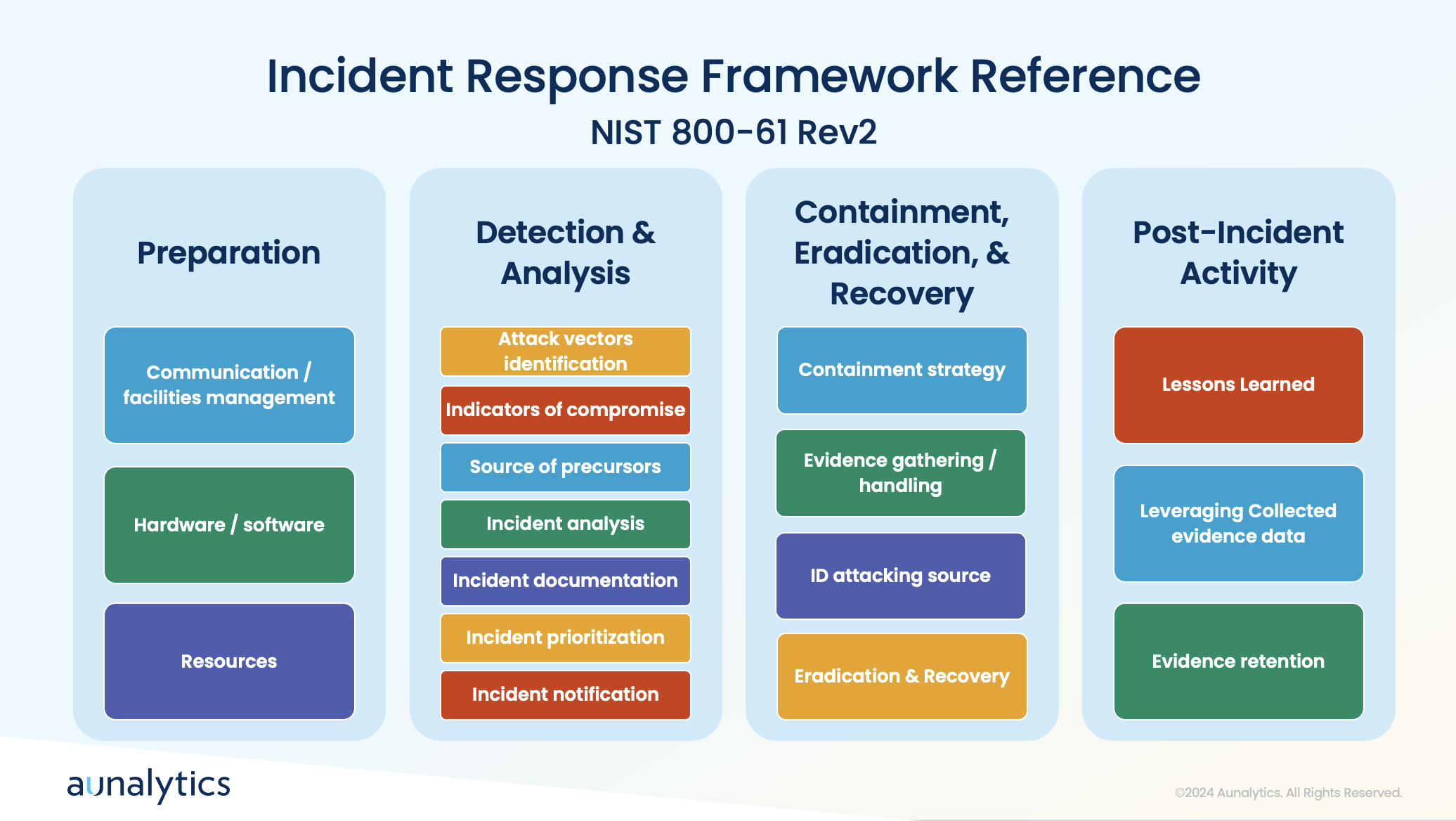
While putting safeguards in place to prevent cyberattacks from occurring is imperative, it is also equally important to prepare your organization to respond appropriately when an incident does occur. During a cyberattack, it’s crucial to have tools in place to detect anomalies and communicate effectively. Quick actions include containing the incident by taking affected systems offline, blocking access to malicious platforms, and assessing the scope of the breach.
A clear communication plan and understanding of the attack’s attribution are essential for effective recovery. Preparation involves establishing processes for detection, analysis, containment, eradication, and recovery, followed by post-incident activities to improve future responses.
Employee Training and Awareness

To ensure that all areas of a company take an active role to prevent cyberattacks, it’s crucial to foster a strong security culture. Unfortunately, employees often make mistakes that lead to breaches, such as falling for phishing schemes or responding to solicitation calls. Educating staff about the tactics used by attackers, such as impersonation and social engineering, can help prevent these errors.
Therefore, it is crucial to ensure that all employees have access to cybersecurity training—this training covers the basics of recognizing bad actors and avoiding common traps.
Tailoring training to specific roles and conducting phishing email simulations can enhance employees’ ability to identify and respond to threats. Creating a culture of cybersecurity awareness involves emphasizing the importance of security to employees and their families. This helps instill a sense of personal responsibility for maintaining security practices.
For IT and cybersecurity professionals, it is greatly beneficial to focus on developing a strong understanding of network engineering, including routing, switching, and firewall management. Additionally, the ability to visualize and comprehend data flows and security information is crucial for effective security management. IT teams must avoid cutting corners and ensure robust security measures are in place. They play a critical role in enforcing security policies and preventing breaches, making their diligence essential.
Conclusion
Understanding the tactics used by attackers and implementing robust preventive measures is key to safeguarding your organization. By adopting best practices such as phishing-resistant MFA, regularly updating policies, leveraging threat intelligence, and training employees effectively, companies can significantly reduce their risk of cyberattacks. Additionally, having a well-defined incident response plan and fostering a culture of security awareness ensures preparedness for any potential breaches. By following these guidelines, organizations can better protect their data and maintain a strong defense against cyber threats.

Partnering with Aunalytics ensures your data privacy and security through a comprehensive approach that includes advanced risk assessments, phishing-resistant Multi-Factor Authentication (MFA), and continuous updates to align with industry standards like the NIST Cybersecurity Framework. Our expert team provides 24/7 monitoring and rapid threat response, leveraging cutting-edge technology and threat intelligence to preemptively address risks. With Aunalytics, you benefit from top-tier protective measures and a commitment to adapting strategies to emerging threats, ensuring your data remains secure and confidential.

Staying Secure: Recent Security Breaches and Essential Prevention Strategies
The increasing reliance on digital technologies has led to the increased frequency of security breaches. Recent incidents have highlighted vulnerabilities across several industries, emphasizing the importance of robust cybersecurity measures. Here, we examine some notable security breaches that have recently made headlines, detailing the “how” and the responses taken to mitigate future risks.
Microsoft Azure and Executive Accounts
In a significant cyberattack on Microsoft Azure in January 2024, hackers exposed the accounts of hundreds of Microsoft senior executives to unauthorized access, with the use of phishing attacks and malicious links. The attackers used a password spray attack to break into the accounts, which is when an attacker tries several passwords across multiple user accounts to avoid detection systems. This breach allowed unauthorized access to Microsoft email accounts, leading to the exfiltration of sensitive emails and attached documents. The attackers also targeted source code and infrastructure, emphasizing the importance of heightened vigilance against sophisticated phishing tactics.
One extremely effective way to ward against this type of attack is to create strong passwords and change them regularly to prevent them from being hacked, as well as using multi-factor authentication.
Bank of America Third-Party Data Breach
Attackers understand that large banks have robust cybersecurity measures to protect their networks. However, many third parties lack similar resources and may not yet prioritize cybersecurity education or infrastructure. This makes them more likely to be targets for cybercriminals seeking vulnerabilities to exploit when sharing data with major institutions. This incident underscores the critical need for financial institutions to strengthen third-party vendor security protocols and ensure robust data protection measures.
The ransomware group LockBit orchestrated a breach targeting Bank of America in February 2024 via its third-party vendor, Infosys McCamish. Personal information—including names, Social Security numbers, and account details of over 57,000 individuals—was compromised.
Ascension Ransomware Attack
Such attacks necessitate comprehensive cybersecurity strategies to safeguard critical healthcare infrastructure and ensure uninterrupted patient care. Moreover, ensuring robust disaster recovery plans and reliable backups can get services back on track faster, which is particularly crucial for healthcare systems, because extended delay can directly impact patient care and safety.
Ascension, the owner of 15 hospitals in Michigan, fell victim to a ransomware attack in May 2024 that disrupted electronic health records systems, phone systems, and scheduling processes. Non-emergency procedures and appointments were suspended, highlighting the operational impact of cybersecurity incidents on healthcare services.
New York City Metropolitan Transportation Authority (MTA) Cyberattack
In 2020, research showed that municipalities, which are already vulnerable targets for cybercrime, faced 44% of global ransomware attacks—equating to approximately 133,496,000 incidents. An April 2021 cyberattack on the New York City Metropolitan Transportation Authority (MTA) compromised 18 systems, including those controlling train operations and safety mechanisms. This breach posed serious implications for public safety and operational continuity.
Following the attack, MTA swiftly implemented federally recommended security enhancements and mandated password changes and VPN switches for employees and contractors, illustrating proactive steps to fortify cybersecurity defenses.
Moving Forward: Prevention Procedures
Preventing security breaches requires a multi-faceted approach that empowers teams and safeguards organizational assets. Regular training sessions are essential to educate employees on identifying phishing emails, creating robust passwords, and understanding the importance of safeguarding sensitive information. This measure ensures everyone understands their role in preventing data breaches.
Strengthening asset management through classification, organization, automation, and continuous monitoring helps maintain an up-to-date inventory, facilitating informed decision-making and enhancing troubleshooting capabilities. Effective management and monitoring of access rights, supported by IAM, routine account audits, SSO, and multi-factor authentication, are also critical for ensuring only authorized personnel have access to certain resources.
Another strategy to prevent security breaches is implementing robust firewalls and antivirus software services, which can serve as the frontline defense against malicious threats. Regular updates to these defenses are crucial to identifying and addressing vulnerabilities promptly. Additionally, implementing automated data backup systems across multiple locations provides a safety net against data loss and physical damage, ensuring business continuity even in the face of unforeseen incidents. By integrating these preventive measures into comprehensive cybersecurity strategies, organizations can effectively mitigate risks and protect sensitive information from increasingly sophisticated cyber threats.
At Aunalytics, we are committed to preventing security breaches—protecting customer data is our top priority. We adhere to stringent security protocols, including regular employee training, robust encryption measures, and continuous monitoring of access controls. Our goal is to ensure our clients are utilizing the latest security technologies and best practices to stay protected, while having the right backup and disaster recovery strategies in place to get their businesses back up and running as quickly as possible in the event of a cyber event or disaster scenario.
Think You Know Ransomware? Fighting Cybercrime: Weapons and Warriors
Cybercrime is no longer an inconvenience for an unlucky few—rather, it has far-reaching implications for the global economy, as well as national security. According to the World Economic Forum, the annual cost of cybercrime is projected to reach $10.5 trillion in 2025. In addition to economic consequences, hostile countries such as North Korea have been known to fund their weapons programs through cyberattacks and crypto theft. Therefore, fighting cybercrime should be a top priority for both governments and organizations of all sizes.
It is almost impossible to find an organization, or even an individual, who does not deal with the storage and transmission of data in one way or another. That makes anyone a target. And, unfortunately, the weakest links in the chain are oftentimes the users themselves. Anyone can mistakenly open a dangerous email or click on a malicious link, and that is all it can take to compromise an entire organization.
So how can organizations fight back and protect themselves from this looming threat?
As technology enables more complex attacks, experts say that combatting cybercrime requires a human skillset—including security awareness education for each and every individual, as well as advanced cybersecurity technology paired with 24×7 monitoring. In the last video of their three-part series on ransomware, Sophos, an Aunalytics technology partner, explores ways the security community is fighting cybercrime—from blockchain analytics to advanced prevention techniques.
View the episode on Vimeo.
Are you certain your organization is fully protected? If you aren’t sure, the security experts at Aunalytics can help you determine your organization’s risk. We offer a complete suite of managed security services and maintain a highly secure cloud environment utilizing security best practices. Aunalytics partners with leading technologies in the security field, such as Sophos, to ensure that your organization always stays a step ahead of hackers and other bad actors. Don’t leave your organization vulnerable—contact Aunalytics today.
Think You Know Ransomware? The Faces of Cybercrime: The Hunters and The Hunted
Ransomware attacks are not simply a nuisance—a single attack can affect thousands of computers and servers, cost companies huge sums of money, or prevent businesses from operating altogether. And it’s not just large corporations that are at risk. Governments, universities, police forces, healthcare organizations, and even small businesses are brought to their knees by cybercrime. Anyone can be a victim—it can be as simple as one person clicking on a malicious link in an email.
Once attacked, organizations are faced with a dilemma. Either pay a large ransom and hope the attacker will actually provide the key to recover their data, or try to mitigate the loss of data on their own, which can be expensive and extremely time consuming. Yet, even if an organization chooses to pay a ransom to recover data right away, they will likely still face negative consequences from the breech, including lost productivity, risk of litigation, and loss of customer trust.
Despite the magnitude of this issue, it has been very difficult for authorities to catch and prosecute cybercriminals. In fact, the problem is only getting worse as these individuals continue to succeed in making large sums of money from the comfort of their own homes—without facing any consequences.
Why are cybercriminals able to flourish, and what can we do to stop them? Part two of Sophos‘ documentary series on ransomware explores the risks of cybercrime to organizations both large and small, and examines the various factors that have led to an increase in ransomware attacks.
View the episode on Vimeo.
Are you certain your organization is fully protected? If you aren’t sure, the security experts at Aunalytics can help you determine your organization’s risk. We offer a complete suite of managed security services and maintain a highly secure cloud environment utilizing security best practices. Aunalytics partners with leading technologies in the security field, such as Sophos, to ensure that your organization always stays a step ahead of hackers and other bad actors. Don’t leave your organization vulnerable—contact Aunalytics today.

Think You Know Ransomware? The Origins of Cybercrime
How well do you know ransomware? Security hacks and ransomware attacks are constantly in the news. In fact, in June 2023, a zero-day vulnerability in Progress Software’s MOVEit Transfer managed file transfer (MFT) product affected over 130 organizations and millions of individuals. And that is only the latest in a constant stream of cybercrime.
Since the advent of the internet, hackers have been developing increasingly sophisticated attacks. But what is most concerning may be that what was once only achievable by highly-skilled hackers is now accessible to anyone. Would-be cybercriminals can easily access the tools and knowledge via the internet to mount an attack. Currently, that most often takes the shape of a ransomware attack—which makes any industry with data a target. Despite this fact, many organizations and individuals continue to remain vulnerable.

Sophos, a leading security software and hardware company, and one of Aunalytics’ technology partners, has released a three-part documentary series examining the history of cybercrime and how it affects everyone—from small businesses to local and national governments. The first episode examines origins of cybercrime and explores why many interconnected systems are susceptible to ransomware attacks. Watch it below:
View the episode on Vimeo.
Are you certain your organization is fully protected? If you aren’t sure, the security experts at Aunalytics can help you determine your organization’s risk. We offer a complete suite of managed security services and maintain a highly secure cloud environment utilizing security best practices. Aunalytics partners with leading technologies in the security field, such as Sophos, to ensure that your organization always stays a step ahead of hackers and other bad actors. Don’t leave your organization vulnerable—contact Aunalytics today.
Financial Institution Cyber Attacks Are on the Rise—Your Institution Is Not Immune
With recent uncertainty in the economy and bank closures hitting the news this year, you may be scrambling to find ways to increase deposits to protect your institution. But a larger, more urgent risk has always been lurking. With over half of financial institutions reporting cyber attacks in a single year, your organization may be next.
Nearly every day we learn of new horror stories from financial institutions who were the victims of elaborate attacks—in fact, 55% reported being a victim of a cyber-attack in a single year.
Bad actors are becoming more sophisticated in their methods. These prevalent attacks have high costs to your business uptime and productivity. A bad attack can also damage your reputation due to closure and data loss, while still costing your bank or credit union large sums of money to pay off ransoms—and you may not even get all of your data back.
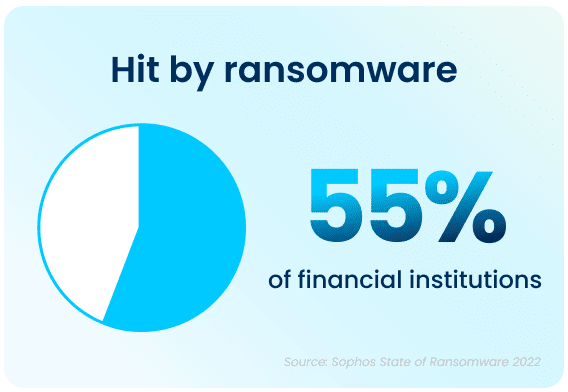
Financial institutions hit by cyber-attacks pay, on average, $272,655 in ransom payments. And the average overall cost to remediate the ransomware attack in this sector is $1.59 million.
Do you know where your data lives?
Where you store your data matters, and your storage location may not be optimal for disaster recovery. Storing your backups locally, even if located at another of your facilities, may not protect your data from unknown risks.
In-house servers require large capital expenditures, and you miss out on economies of scale for regular upkeep and maintenance. Giant vendors may seem convenient, but you won’t know exactly where your data resides, and you lose control over the environment.
There’s a better way—Aunalytics backup and disaster recovery solutions can help you avoid losing data or paying large ransoms. We offer concierge solutions tailored to community banks and credit unions—helping you stay steps ahead of increasingly malicious attackers.

Backup and disaster recovery solutions enable the continuous operations of an organization during a disaster event, whether it involves a set of networks or servers, or when all primary IT services have become unavailable. Our solutions leverage the power of data, analytics, and Machine Learning. Disaster Recovery Services, coupled with a comprehensive backup and archival strategy, allow you to remain confident that you are prepared should your business encounter a disaster event.

Microsoft will be ending patch support for Windows 10—what does that mean for you?
Preparations to end patch support for Windows 10, and eventually end of support entirely, have been in process for quite some time on Microsoft’s part. As far back as 2021, in an article by The Verge which talks about the then upcoming Windows 11, the author commented on the end of support date for Windows 10. The current version of Windows 10, 22H2, will be the final version of Windows 10, and all editions will continue to receive monthly security update releases through the end of support on October 14, 2025. This information applies to all of the following editions of Windows 10: Home, Pro, Pro Education, and Pro for Workstations
With the end of patch support for Windows 10, vulnerabilities will begin to appear, leaving your network more exposed than ever. The number of bad actors encrypting and stealing data can be overwhelming on the best of days and can cause massive issues and downtime for your company. Any hole in your cyber security could spell disaster for your company.
While it may seem like you have plenty of time to prepare, deadlines can quietly slip by, leaving your network and machines suddenly vulnerable because they are no longer receiving support or security patches. The rate of ransomware attacks remains high, with 66% of respondents across all industries indicating they had been hacked within the last year, says Sophos in their State of Ransomware 2023 report.
With a total of 36% respondents, Sophos also reported exploited vulnerabilities as the number one root cause of ransomware attacks within the last year. Knowing that 66% of companies surveyed in the last year were attacked by malicious actors, the number of ransomware attacks with the root cause of exploited vulnerabilities is quite large.
It’s hard to admit that your network may become unsafe at any point in time, but it’s necessary if you want to be prepared for when your Windows 10 network will no longer be supported. If you can keep track of those important dates, your cyber security should be on the right track. However, it can be a huge undertaking to efficiently manage patching or replace workstations in a timely manner.
With the right partner, you can stop worrying about missing important updates, especially as the end of patch support for Windows 10 is nearing. Aunalytics has a team of security experts, as well as technical support, with the ability to act as your Network Operations Center (NOC). Aunalytics also offers Co-Managed Patching-as-a-Service and many other ways to support the technology that keeps your business up and running. With the support of an experienced Managed IT Services partner, you can rest easy knowing that your cyber security is working hard to keep your data and network safe.